Most small business websites don't generate a single new customer. Slow load times, no LocalBusiness schema, and contact forms that sit empty are the usual culprits. We build WordPress sites for Maryland small businesses that rank in local search, load fast, and turn visitors into paying customers. Fixed-scope from $1,500.
Free site audit
We review your current site and send a plain-English audit within 2 business days. No sales call required.
Small business website design is building a custom WordPress website for Maryland sole traders, retail shops, and service businesses that ranks in Local Pack for primary service queries and converts organic visitors into phone calls, form submissions, or booked appointments. The build centres on LocalBusiness schema tailored to the specific business type, mobile-first conversion architecture, and fixed-scope delivery from $1,500.
Why customers leave before contacting
88% of consumers research a local business online before visiting or calling. If your site loads in 7 seconds on mobile, lacks LocalBusiness schema, and ranks for nothing except your business name, your website is a digital business card, not a marketing tool. Every day it stays that way is revenue going to a competitor whose site actually shows up.
Free WordPress themes and Wix templates produce sites that look identical to your competitors. There's no reason for a customer searching 'HVAC Frederick MD' to choose your site over the next one in search results unless your site loads faster, communicates value more clearly, and has the trust signals (reviews, credentials, service areas) that they're looking for.
A phone number at the bottom of the page is not a lead capture system. A properly built contact or booking form, asking for the right information at the right moment, captures inquiries at 8-10pm when your office is closed. Without one, you're losing every after-hours customer to whoever picks up a live chat or has an online booking widget.
What we build into every site
A small business site is not a brochure. It is a lead generation system. Every element we build, from schema to forms to city pages, is designed to do one job: turn a searching stranger into a paying customer.
Every page receives LocalBusiness JSON-LD markup: business type, geographic service areas, operating hours, price range, and service categories. This is the technical foundation that enables Local Pack visibility for searches like 'HVAC repair Frederick' or 'plumber near me Annapolis.' Without this markup, Google treats your business as a generic listing rather than the specific local service you provide. Our <a href="/services/wordpress-web-design/">custom WordPress web design service</a> includes this schema on every build.
A contact form that asks only for a name and email produces unqualified inquiries. We build forms that capture service type, location, timeline, and project scope before submission, so your team can respond with context and your calendar stays filled with the right jobs. WPForms and Calendly integrations included in Growth and Custom tiers.
If your site doesn't have dedicated pages for each city and county you serve, you don't rank for those city-specific searches. We build targeted landing pages for your full service territory. Every city page uses unique copy, proper LocalBusiness schema with that city's coordinates, and is internally linked to build authority across your market.
Trust is the conversion variable most small business sites ignore. We integrate your Google Reviews feed, display testimonials with ReviewRating schema, and structure your homepage to lead with credentials, years in business, and local market proof. These trust signals are the deciding factor when a customer is choosing between two businesses in the same category.
The Google Maps 3-pack is the highest-ROI marketing channel for most Maryland small businesses, providing free visibility for every 'near me' search in your category. We audit and optimize your GBP: correct business category, service areas, products and services, Q&A, and photo uploads. We also ensure citation consistency across Yelp, BBB, and industry-specific directories.
We guarantee your site ships with green Core Web Vitals, or we fix it before launch at no cost. Small business sites built on shared hosting with unoptimized images routinely fail these benchmarks and are deprioritized in search rankings. Our builds use a performance-first WordPress stack with CDN delivery and sub-2-second mobile load times.
Portfolio spotlight
USA · Home Services
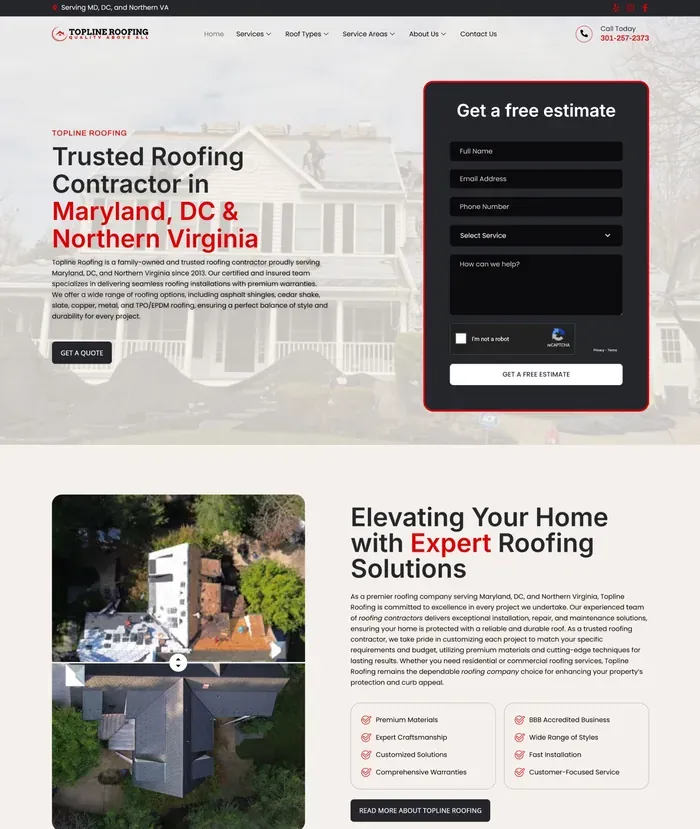
Roofing contractor revamp with multiple page templates for services, roof types, and service areas.
View live site: toplineroof.comHow we work
Every project follows the same four-phase process. You always know what week you are in, what is being delivered, and what we need from you. Fixed timeline, fixed price, in writing before we start.
DELIVERABLES
We audit your current site for technical SEO, Core Web Vitals, and schema gaps. We analyze your top 5 local competitors' online presence and identify the gaps you can exploit. You receive a written strategy document: keyword targets, GBP gaps, page list, and service territory map.
DELIVERABLES
We generate your homepage and key service pages using AI-assisted design built around your business type and target customer. We draft all copy: service descriptions, service area frameworks, and trust copy. One consolidated feedback round.
DELIVERABLES
Approved designs go into WordPress. Every service and city page gets LocalBusiness schema. Lead capture forms with conditional logic are built and tested. Google Reviews integration is configured. You get a staging link to review weekly.
DELIVERABLES
We handle DNS cutover, 301 redirects, and sitemap submission. Your GBP and key directory listings are audited and made consistent. You receive a handoff video and 30-day post-launch monitoring window.
Most clients are live within 8 weeks of their first call. No retainer required after launch.
Transparent pricing
Every tier is fixed price, fixed scope, fixed timeline, defined in a written statement of work before we invoice a dollar. No hourly billing. No surprise line items for additional revisions. You know exactly what you are buying and when it will be done.
All tiers available with a monthly care plan from $150/month: WordPress updates, weekly backups, uptime monitoring, and priority support within 4 business hours.
Complete guide
Everything Maryland small business owners need to know about building a website that works as a 24/7 sales tool, ranks in local search, and gives you a professional online presence without overpaying for features you don't need.
Do small businesses need a website in 2026? Yes, without exception. A 2025 BrightLocal survey found that 98% of consumers used the internet to find local businesses. A phone number on a Facebook page is not a substitute for a website that ranks, converts, and builds trust around the clock.
Most small business websites in Maryland fail at the same three fundamental jobs, not because the owners didn't try, but because the people who built the sites prioritized appearance over function. Good local business website design is not about looking impressive. A website for a Maryland small business has to do exactly three things well, and if it misses any one of them, it becomes an expensive brochure that sits on the internet doing nothing.
The first job is immediate clarity: a visitor who lands on your site should know within three seconds who you are, what you do, and what area of Maryland you serve. This sounds obvious, but the vast majority of small business sites bury this information. The owner knows their business so well they forget that a stranger arriving from a Google search has zero context. If your homepage doesn't state your service and your location in the first screen of content, you are losing customers before they ever read a word about you.
The second job is conversion: giving customers a clear, frictionless way to contact you, request a quote, book an appointment, or make a purchase. A phone number that requires scrolling to find, a contact form buried on a separate page, or a site with no clear call-to-action at all will bleed leads. Local customers in Maryland are ready to act when they search. They have a plumbing problem, they need a caterer, they need a landscaper before the weekend. If your site doesn't make it easy to reach you in the first thirty seconds, they move to the next result.
The third job is discoverability: ranking in local search so new customers find you in the first place. This is where DIY website builders and Facebook Business Pages collapse under scrutiny. Wix and Squarespace templates are designed to look attractive, not to rank in local search. They offer limited control over the technical signals Google uses to evaluate local relevance, particularly LocalBusiness schema markup, which tells Google exactly what type of business you are, where you're located, and what hours you keep.
Search behavior for local businesses is fundamentally different from national brand searches. When someone searches for a product from a national brand, they might be researching, comparing, or reading reviews over days or weeks. When someone searches "roof repair Annapolis" or "tax preparer Frederick MD," they are almost always ready to hire. The intent is high, the timeline is short, and the decision comes down to who appears first and whose site builds the most trust in the shortest time.
A Facebook Business Page cannot replace a website because you don't own it. Facebook controls the algorithm that determines whether your page appears in search, and that algorithm prioritizes Facebook's interests, not yours. Your page can be suspended, throttled, or buried behind paid posts at any time. More critically, a Facebook page cannot be indexed and ranked by Google the way a properly built website can. It cannot carry schema markup, it cannot be optimized for keyword-specific pages, and it cannot build domain authority over time.
The difference between a website that looks good and one that generates business is measurable. A professionally built Maryland small business site with proper schema, a clear above-the-fold value proposition, mobile-first design, and a frictionless contact flow will consistently outperform a prettier site that lacks those fundamentals. Local customers are not judging your aesthetic taste. They are asking: "Is this business legitimate, do they serve my area, and can I reach them right now?" Your website needs to answer all three questions in under ten seconds.
Every Maryland small business website needs a defined set of pages, each doing a specific job in the customer's journey from stranger to paying client. Getting the page structure right from the start saves significant rework later and builds a foundation that compounds in search visibility over time.
The homepage is your most important page and your most visited. Above the fold, before any scrolling, it must communicate four things: what you do, who you serve, where you're located, and what the visitor should do next. The primary CTA (whether that's "Get a Free Quote," "Book a Consultation," or "Call Us Now") needs to be visible without any action from the visitor. Everything else on the homepage exists to support that first conversion moment.
Services pages carry significant SEO weight because they let you target specific keyword phrases. A landscaping company in Frederick, Maryland should have individual pages for "lawn maintenance," "hardscaping," and "tree trimming" rather than one combined services page, because each page can rank for its own set of searches. The rule of thumb: if a service has its own search demand, it earns its own page. If it's a minor add-on with no independent search volume, it lives on a parent services page.
The about page is underestimated by small business owners and overvalued by designers. Its real job is trust. Local Maryland customers hire people they feel they know. An about page with a genuine photo of the owner or team, a real story about why you started the business, and specific mention of your Maryland roots consistently outperforms a generic "we are passionate about serving our clients" paragraph. People hire people.
The contact page needs more than a form. It needs your phone number in large type, your email address, your physical address (if you have one), your operating hours, and an embedded Google Map. Every element that reduces uncertainty increases the likelihood of contact. Include a line about response time: "We reply within 4 business hours" removes the anxiety of not knowing whether you'll hear back.
Additional pages that serve both users and SEO include a testimonials or reviews page (social proof at scale), an FAQ page (which directly intercepts search queries and reduces the pre-sale friction that kills leads), and a blog for publishing locally relevant content that accumulates search visibility over months and years. Don't overlook the thank-you page that appears after a form submission. It should confirm the submission, set a response time expectation, and offer a secondary action. A properly configured thank-you page also allows you to track form conversions in Google Analytics with precision. Finally, a 404 error page with clear navigation prevents visitors from hitting a dead end and leaving entirely.
LocalBusiness schema is the most important technical element most small business website design Maryland projects are missing. It is also one of the least understood. Schema markup is structured data, written in a format called JSON-LD schema and placed in your page's HTML head, that communicates directly with Google's indexing systems. Rather than waiting for Google to infer what your business is from your page text, schema tells Google explicitly: this is the type of business, this is the address, these are the hours, this is the phone number, these are the services.
Google uses this information to power rich results in search: the Business Panel that appears on the right side of desktop search results, the Local Pack listings that appear above organic results for local searches, and the structured data that populates voice search responses. Without schema, Google is guessing. With schema, Google is reading a structured document that leaves nothing to interpretation.
The key fields every Maryland small business schema implementation needs include: the business name, the @type (which tells Google what category of business you are), a structured PostalAddress object with your street, city, state, and zip, your telephone number, OpeningHoursSpecification for each day you're open, your website URL, a priceRange indicator, and an areaServed field that lists the Maryland cities and counties you serve. Getting all of these right transforms how Google understands and categorizes your business.
Choosing the right @type is more important than most guides acknowledge. Google recognizes over 200 subtypes of LocalBusiness. A general contractor should not just use "LocalBusiness" when "GeneralContractor" exists. A dentist should use "Dentist" under "MedicalBusiness." A restaurant should use "Restaurant" rather than "FoodEstablishment." The more specific the type, the more accurately Google can match your business to the right searches. Using the wrong type is like filing in the wrong category at the library: you exist in the system but you're almost impossible to find.
In WordPress, RankMath Pro is the simplest way to implement LocalBusiness schema correctly. It provides a structured interface for entering your business details and generates valid JSON-LD automatically. Once implemented, verify your schema using Google's Rich Results Test at search.google.com/test/rich-results. Paste your homepage URL and confirm that Google can read all your structured data without errors or warnings.
Schema markup is distinct from meta tags, which is a common point of confusion. Meta tags (title, description) influence how your page appears in search results. Schema communicates the categorical and factual nature of your business to Google's knowledge graph. Both matter, but for local businesses specifically, correctly implemented LocalBusiness schema has a more direct path to influencing Local Pack eligibility, which is where the highest-value local traffic comes from. A Maryland small business site without LocalBusiness schema is leaving significant local search visibility on the table.
For most Maryland small businesses, Google Business Profile (GBP) is the single highest-leverage marketing asset available, and the majority of small business owners have either not claimed it, set it up incompletely, or left it dormant after the initial setup. The Google Local Pack, the three business listings that appear in a map section above organic search results for local queries, is where the most valuable local search traffic lives. Those positions are not determined primarily by your website. They are determined primarily by your GBP signals, review volume, and the accuracy and completeness of your profile.
Setting up GBP correctly from the start prevents significant problems later. Start with your business name: use your real legal or trade name, with no keyword stuffing (adding "best plumber in Baltimore" to your business name violates Google's guidelines and can result in suspension). Category selection is the most consequential single decision in your GBP setup. Your primary category tells Google which searches to show you for, and choosing incorrectly means appearing for the wrong intent. A landscaper who selects "Lawn Care Service" instead of "Landscaper" will miss a significant portion of relevant local searches. Research which category your top competitors are using and what search queries each category tends to rank for.
If you serve customers at their location rather than at a physical storefront, configure your profile as a Service Area Business and list the Maryland cities, counties, or zip codes you serve. If you have a physical location customers visit, enter your full address and verify it with the postcard Google mails to your address. Get this right from the start. Changing your address or category after verification can reset your ranking signals temporarily.
Photos have a dramatic, documented impact on GBP performance. According to Google's own data, businesses with more than 100 photos receive 520% more calls and 2,717% more direction requests than businesses with only 10 photos. For a Maryland small business, this means uploading photos of your team, your work, your equipment, your storefront, before-and-after project photos, and community involvement. Add new photos consistently over time. GBP rewards active profiles.
GBP Posts allow you to publish promotions, announcements, new services, and events directly to your profile. These appear in search results and in the Knowledge Panel. They expire after seven days for standard posts, so publishing weekly keeps your profile active and gives Google fresh signals. The Q&A section is another underused tool: you can ask and answer your own questions there, effectively planting the search queries your customers use and answering them publicly. This content is indexed and can appear in featured snippets.
Many Maryland businesses still search for "Google My Business optimization" using the platform's old name. Whether you call it GMB or GBP, the strategy is the same: complete every field, choose the right primary category, upload consistent photos, generate reviews actively, and post updates weekly. The name changed in 2021, but the ranking signals have only grown more important since.
Review management is not optional for competitive Maryland markets. Respond to every review, positive and negative, within 24 to 48 hours. Your response to a negative review is more influential with potential customers than the review itself. A professional, non-defensive response signals that you take customer service seriously. Track your GBP Insights monthly to understand how customers are finding your profile (direct search vs. discovery search), what actions they take (website clicks, calls, direction requests), and how your photo views compare to businesses in your category. This data connects directly to your website traffic and helps you understand which GBP optimizations are actually moving the needle.
The question Maryland small business owners ask most is also the one with the most misleading answers. Website pricing varies so dramatically, from $0 to $50,000, that the range itself is almost meaningless. What matters is understanding what you're actually buying at each price point and what the total cost of ownership looks like over three to five years, not just at launch. We publish transparent pricing with fixed-scope tiers so you know exactly what you are buying before you sign anything.
DIY website builders like Squarespace ($23 to $65 per month) and Wix ($17 to $159 per month) advertise their subscription costs as the primary expense. They omit the most significant cost: your time. Building a small business website on a template platform, even with a template, takes most non-technical business owners between 20 and 40 hours. At even a modest estimate of your hourly value, that represents a real expense. Beyond the time cost, template platforms have meaningful limitations for local SEO: limited or no control over schema markup, restricted access to technical SEO settings, poor Core Web Vitals performance by default, and the long-term risk of being locked into a platform you can't migrate from without rebuilding from scratch.
A template-based WordPress site built by a freelancer costs between $500 and $1,500. At this price point you're getting the technical build but not copywriting, photography, SEO setup, or schema implementation. The site will look functional, but without those elements it will likely not rank competitively. You may also be working with someone who builds sites as a side project, which affects support availability and quality of output. Ask specifically what is and isn't included before signing anything.
A custom WordPress build from an established agency ranges from $1,500 to $5,000 or more for a small business site. Affordable website design for Maryland small businesses starts at $1,500 for a properly scoped five-to-six page site with schema and SEO setup included. What drives cost upward: custom design (vs. using a premium theme), the number of pages, complexity of functionality (online booking, e-commerce, membership areas), copywriting, professional photography, and ongoing support. A well-scoped small business site, five to eight pages with copywriting and SEO setup, falls in the $2,500 to $4,000 range with a reputable Maryland-area agency.
Most agency quotes include the design and build but exclude several items that are essential for the site to perform. Confirm whether your quote includes: copywriting for all pages, SEO setup including keyword research and on-page optimization, LocalBusiness schema implementation, Google Analytics and Search Console configuration, and ongoing maintenance. These exclusions are not deceptive. They are genuine scope decisions, but not knowing about them leads to surprise costs after launch.
The most useful comparison is not $1,500 vs. $3,000 at launch. Consider what each option costs over three years and what each one generates in return. A $500 template site that never ranks and never generates a lead costs effectively as much as the three years of hosting and domain you paid for it. A $3,000 custom site that ranks for competitive Maryland local searches and generates ten new customer inquiries per month has a return on investment that makes the upfront cost trivial within the first quarter. Evaluate proposals by what deliverables are included and what results are realistic, not by which number is lowest.
The platform debate is one of the most common conversations Maryland small business owners have before launching a site, and most of the advice online is written by people with a vested interest in one platform over another. Here is an honest assessment of each option as it applies specifically to a local small business competing in Maryland markets.
WordPress powers roughly 43% of all websites on the internet, and for good reason. It offers complete control over every technical element that matters for local SEO: custom schema markup, full access to server configuration, a plugin ecosystem that includes every tool a local business could need (RankMath for SEO, Wordfence for security, WPForms for lead capture, and hundreds more), and no platform lock-in. When you build on WordPress, you own your site. You can move it to a different host, hand it off to a different developer, or customize it to any degree you need. The weaknesses are real: WordPress requires ongoing maintenance (core, theme, and plugin updates), it has a steeper learning curve for non-technical owners who want to make their own edits, and a poorly maintained WordPress site is the most common vector for small business website hacks.
Squarespace produces polished templates and is legitimately easier to manage on an ongoing basis than WordPress. For a Maryland business where aesthetics are paramount, such as a photographer, event planner, or boutique retailer, Squarespace's visual templates can give you a polished online presence faster than any other option. The limitations matter, however: schema control is minimal, local SEO configuration is surface-level, and if you ever want to migrate off Squarespace to a platform with more capability, you are effectively rebuilding from scratch. Squarespace does not export in a format that transfers cleanly to WordPress.
Wix is the easiest platform to use and the hardest to outgrow gracefully. Its drag-and-drop editor is usable for non-technical users, and for a brand-new business testing a concept with no marketing budget, a Wix site is better than no site. The technical problems accumulate quickly, though: Wix sites consistently score poorly on Core Web Vitals, which directly affects both search ranking and user experience. Schema support is limited. The codebase it generates is bloated by design. And like Squarespace, migration off Wix is effectively a full rebuild.
The right platform for a Maryland small business depends on your situation. If you're a new business with no competition and no budget, a Wix or Squarespace site gets you online quickly and cheaply. If you are actively competing for local keywords, have a physical location, take online leads seriously, or plan to invest in content marketing over time, WordPress is the correct choice. The platform lock-in risk of Squarespace and Wix is underweighted in these decisions. Starting on a platform you'll eventually need to leave costs you twice: once for the original build, and again for the rebuild when you outgrow it.
Local SEO is the set of practices that determine whether your business appears when Maryland customers search for what you offer in your area. Local business SEO is distinct from general SEO in that it relies on three interconnected signals: what your website communicates, what your Google Business Profile communicates, and what the broader internet says about your business through citations and reviews.
The way Maryland customers find local businesses has shifted significantly. The most common pathways are Google Maps (where the Local Pack listings appear), "near me" searches (which are location-aware and return results based on the searcher's current position), and city-plus-service searches ("HVAC repair Rockville," "personal injury attorney Bethesda"). Each of these search types relies on different signals, which is why local SEO requires attention to multiple systems simultaneously rather than just optimizing your website in isolation.
A local SEO strategy for a Maryland small business starts with on-page optimization: including your city and service keywords in your page titles, meta descriptions, H1 headings, and body copy in a natural way. It means having location-specific content on your homepage and on dedicated city landing pages if you serve multiple Maryland markets. It means your NAP (Name, Address, Phone) matching exactly what appears on your Google Business Profile, because inconsistencies across the web confuse Google's local algorithm and dilute your ranking signals.
Local citations are mentions of your business name, address, and phone number on other websites. The most important citation sources for Maryland small businesses are Yelp, the Better Business Bureau, Facebook, your local chamber of commerce (the Maryland Chamber of Commerce and your county-level chamber), and any industry-specific directories relevant to your category. These citations act as corroborating evidence for Google that your business exists, is located where you say it is, and is active. The key requirement is consistency: your business name, address, and phone must appear in identical format across every citation source. Even minor variations ("St." vs. "Street," "(301) 555-0100" vs. "301-555-0100") can create duplicate listings that split your citation signals.
Review signals are among the most significant local ranking factors Google uses. Volume, recency, and your response rate all contribute. A Maryland business with 50 reviews averaging 4.7 stars, with consistent owner responses, will consistently outrank a business with 12 reviews and no responses, all else being equal. Building a review generation system, asking satisfied customers at the right moment and sending a follow-up text or email with a direct link to your GBP review form, is one of the highest-ROI activities a Maryland small business owner can invest twenty minutes a week in.
Timeline expectations for local SEO in Maryland vary significantly by market size. In smaller Maryland markets, such as Cumberland, Hagerstown, or Easton, a properly optimized site can begin appearing in local search results within four to six weeks of launch. In Baltimore city and competitive suburban markets like Montgomery County, realistic expectations are three to six months for meaningful movement and six to twelve months for competitive keyword dominance. Tools like Google Search Console (free) track how your site is performing in search, and BrightLocal or Whitespark can help manage citation building and track local keyword rankings across Maryland zip codes.
The contact page is the most consequential page on a small business website and the one most frequently treated as an afterthought. A poorly designed contact page is the final barrier between a motivated local customer and a new business relationship. Every friction point on that page (a phone number that requires scrolling to find, a form with eight required fields, no indication of when you'll respond) reduces conversions measurably. For a local business where each lead has real dollar value, the contact page deserves the same design attention as the homepage.
The single most important element on a small business contact page is a large, visible phone number. Local customers, particularly those on mobile, prefer calling over filling out a form. The phone number should be in a large font size (24px minimum), positioned at the top of the page before any other content, and formatted as a tap-to-call link on mobile (using an href="tel:" attribute) so that tapping it on a smartphone immediately initiates a call. If your phone number requires scrolling, zooming, or searching to find, you are losing calls every day.
Contact forms should be short. Three to four fields is the optimal length for a small business inquiry form: name, phone or email (choose one, not both as required fields), their service interest (a dropdown), and a brief message field. Each additional required field reduces form completion rate measurably. The research on form length is consistent across industries: cutting from seven fields to four fields can increase completions by 120%. If you need more information to properly qualify a lead, get it on the follow-up call, not on the form.
Set a response time expectation clearly and directly. "We respond within 4 business hours" or "We'll be in touch by the next business day" removes the anxiety of submitting a form into a void. This single line of text increases form submission rate because it answers the implicit question every visitor has: "Will anyone actually see this?" Pair it with a photo of a real team member to add a human face to the promise.
Configure your form to send instant email and text notifications when a submission arrives. WPForms and Gravity Forms both support SMS notifications through integrations with Twilio or similar services. For local service businesses where speed to response is a competitive advantage, receiving an immediate text notification when a lead comes in and calling back within minutes dramatically increases close rates compared to responding hours later when the customer has already hired someone else.
Connect your contact form submissions to a tracking system from day one. At minimum, configure a Google Analytics conversion event to fire on the thank-you page after form submission. For better lead management, integrate your form with a simple CRM or even a Google Sheet using Zapier. This gives you a complete record of every inquiry with date, time, and the referral source, so you can measure which marketing activities are actually generating leads and which are generating traffic that never converts. An embedded Google Map, your operating hours, and a brief "what to expect after you contact us" description round out a contact page that builds trust and converts at a high rate.
Between 60% and 70% of local searches happen on mobile devices, and a significant portion of those searches happen in the moment of need: someone standing in a parking lot, sitting in their car, or walking down the street in downtown Annapolis trying to find a nearby service. This is the customer you are most likely to lose if your site doesn't perform perfectly on a phone. The urgency of local intent combined with the impatience of mobile users creates a brief, high-stakes window in which your website either earns the customer's contact or loses them to a competitor whose site loads faster and is easier to navigate.
Mobile-first design is not the same as "mobile-friendly." Mobile-friendly means your site doesn't break on a phone. Mobile-first means the design process started with the smallest screen as the primary context, and the desktop version was built as a scaled-up adaptation of that mobile experience. The practical difference is significant: a mobile-first site has a clear visual hierarchy, large tap targets, readable font sizes without zooming, and a contact mechanism within one or two taps of landing. A merely mobile-friendly site is a desktop design that has been compressed to fit a smaller screen, with the resulting font size and usability problems that come from that approach.
The most common mobile failures on Maryland small business sites are consistent and fixable. Text that is too small to read without pinching to zoom is a signal failure that drives immediate exits. Buttons that are too close together cause mis-taps, which is frustrating enough to end a session. Horizontal scrolling, where the page is wider than the screen, is almost always caused by an element (an image or table) that has not been made responsive. Forms that don't scale correctly on iOS, particularly due to the zoom-in behavior that iOS triggers when a form field is smaller than 16px, interrupt the conversion flow at the worst possible moment.
Audit your current site's mobile experience using Google's Mobile-Friendly Test (search.google.com/test/mobile-friendly) and by actually testing on multiple real devices, both iOS and Android, in both portrait and landscape orientation. Emulators in Chrome DevTools are useful but not a substitute for real device testing. What looks fine in an emulator sometimes fails on an actual iPhone or Samsung Galaxy due to OS-level rendering differences.
Click-to-call functionality is not optional for local businesses. Every phone number on your mobile site should be wrapped in an anchor tag with href="tel:[your number]" so that tapping it immediately initiates a phone call. This seems like a small detail but it removes a friction point that many potential customers will not bother to work around. If they have to manually dial a number they read off your site, some percentage of them won't bother.
Mobile performance directly affects your Local Pack ranking position. Google's algorithm uses Core Web Vitals as a ranking signal, and the Core Web Vitals measurements that matter are measured on mobile, not desktop. A slow-loading small business site is being penalized in local search regardless of how good its other signals are. Page speed, Largest Contentful Paint (how quickly the main content appears), and Cumulative Layout Shift (how much the page jumps around while loading) are all measurable and improvable. A properly built WordPress site on quality hosting should achieve green scores on all three without heroic effort.
The honest answer to "should I build my own website or hire someone?" is: it depends on what your website needs to accomplish. The reflexive answer from any web design agency is that you should hire them. The reflexive answer from DIY platform marketing is that you can do it yourself in an afternoon. Both are selling you something. The realistic answer requires examining your specific situation against four variables: your budget, your competition, your technical comfort, and your time.
DIY is the right call in a limited set of circumstances. If you are launching a brand-new business with no revenue yet, building a temporary site while you validate your concept makes financial sense. If you serve a local niche with no meaningful online competition, a basic Squarespace or Wix site may rank simply because nothing better exists in that keyword space. If your business model doesn't rely on online lead generation (say, you operate entirely on referrals and have no intention of investing in local search), then a simple DIY site that functions as a digital business card is entirely adequate.
Professional build is worth the investment when any of the following are true. You are competing for local keywords against established Maryland businesses that already have well-optimized sites. You have a physical storefront and local customers are your primary revenue source. You have tried DIY and your site is not appearing in search results after several months of being live. You take online leads seriously and the cost of a single good customer relationship exceeds the cost of professional web design. In any of these situations, the cost of a professionally built site is recovered quickly through incremental leads that a DIY site would not generate.
The hidden cost of DIY is the most consistently underestimated factor in this decision. Building a credible small business website on a template platform, accounting for initial setup, writing all the copy, sourcing and editing photos, configuring the contact form, testing across devices, and setting up Google Analytics, takes most non-technical business owners between 20 and 40 hours for a basic site. That doesn't count the ongoing time for updates and maintenance. At $50 to $100 per hour of business owner time (a conservative estimate for most established entrepreneurs) that's $1,000 to $4,000 in time cost for a site that still may not rank competitively.
When evaluating a professional web design proposal as a first-time buyer, focus on deliverables, not design samples. Ask specifically: what pages are included, who writes the copy, is SEO setup included, is schema markup implemented, what does support look like after launch, and what does the maintenance relationship look like after the first month? A good agency will answer these questions clearly and include them in the contract. A less careful one will be vague about scope and clear only about price.
What a good agency will tell you that a bad one won't: your website alone won't generate business without a Google Business Profile that is properly configured, your site will need ongoing attention to maintain and grow its search visibility, realistic timelines for local SEO are months not weeks, and copywriting quality matters as much as design quality. If an agency promises page-one rankings in thirty days or tells you that a five-page site with a stock template will outrank your established competitors, those are warning signs, not selling points.
Small businesses are among the most frequently targeted victims of automated website attacks, and most small business owners don't discover there is a problem until significant damage has already occurred. The assumption that hackers only target large companies or high-profile sites is the most dangerous misconception in small business website ownership. Automated bots scan every publicly accessible WordPress installation on the internet around the clock, probing for known vulnerabilities in outdated plugins, weak passwords, and unpatched core software. The target is not you personally. It's any site that can be compromised and used as infrastructure for spam distribution, malware hosting, or further attacks.
The consequences of a compromised small business website are serious and disproportionate to the size of the business. Google will blacklist a site that is serving malware or spam links, removing it from search results entirely. This means your site doesn't just stop generating leads. It actively disappears from the internet until the infection is cleaned and the blacklisting is appealed, a process that can take days to weeks. If your site collects customer data through a contact form or e-commerce system, a breach creates potential liability. And the reputational damage of customers seeing a "this site may harm your computer" warning in their browser is difficult to recover from quickly.
The WordPress security fundamentals every Maryland small business site needs are not complicated, but they must all be in place simultaneously to be effective. Strong, unique passwords for every admin account are the first line of defense. Two-factor authentication, available through plugins like WP 2FA, adds a second layer that stops credential-stuffing attacks even when a password is compromised. A limit on login attempts, which Wordfence or Limit Login Attempts Reloaded can provide, blocks brute-force attacks from trying thousands of password combinations automatically. Wordfence Free provides a web application firewall and malware scanner that catches the vast majority of common attack patterns.
Outdated plugins are the single most common entry point for WordPress site compromises. Every plugin that hasn't been updated to patch a known security vulnerability is an open door. This is not theoretical. The WPScan vulnerability database lists thousands of known WordPress plugin vulnerabilities, and automated bots check for them continuously. Keeping every plugin, theme, and WordPress core installation updated is not optional maintenance. It is the primary security measure. Sites that go months without updates in a competitive plugin ecosystem are effectively running with unlocked doors.
Automated backups to an off-site location are your recovery mechanism when everything else fails. The backup must be stored somewhere other than your hosting server, because if the server is compromised, an on-server backup is compromised along with it. UpdraftPlus is the most widely used WordPress backup plugin and supports automated daily backups to Google Drive, Dropbox, Amazon S3, or remote FTP servers. Configure backups to run daily and retain at least fourteen days of backup history. Test your restore process at least once. Knowing theoretically that backups exist is not the same as knowing that your restore works.
If your site is hacked, the recovery sequence matters. Restore from a clean backup taken before the compromise occurred. Identify the entry point by examining server logs and the WPScan report for the vulnerability that was exploited. Change all passwords immediately after restoration. Update everything, core, themes, and plugins, to their current versions before bringing the site back online. Submit a review request to Google Search Console if the site was blacklisted. Then implement the hardening measures that would have prevented the attack in the first place. A monthly care plan that includes managed updates, automated backups, and active security monitoring prevents the vast majority of small business site hacks before they happen.
The most persistent misconception Maryland small business owners carry into a web design project is that a website is a one-time purchase that, once launched, functions indefinitely on its own. The reality is more dynamic and more rewarding for businesses that understand it: a website is a compounding asset that grows in value proportionally to the ongoing attention it receives. The search algorithms that determine your visibility evolve. Your competitors are publishing content and acquiring links. New customers are asking new questions in search engines. The site you launched two years ago, left unchanged, is falling behind in all of these dimensions simultaneously.
Small business marketing in Maryland starts with a site that ranks. Content compounding is the most powerful growth mechanism available to a Maryland small business with a modest marketing budget. Every service page, local landing page, and blog post you publish adds permanently to your site's total search surface area. A blog post answering "how much does a deck cost in Maryland" written today may not generate significant traffic immediately, but six months from now it may be ranking on page one for that query and generating several new project inquiries per month. Multiply this effect across fifteen, twenty, or thirty pieces of well-researched local content and the cumulative impact on your lead flow becomes substantial. Unlike paid advertising, this traffic doesn't stop when you stop paying. It compounds.
Google Search Console is the single most valuable free tool for growing a small business website, and most small business owners have it configured but never log in. The Performance report in Search Console shows you every search query for which your site appeared in Google results, how many times it appeared, and how many times someone clicked through to your site. The most actionable data is in the gap between high impressions and low clicks: these are queries where your site is already appearing but not compelling enough to click. Improving the page title and meta description for those pages, or publishing more complete content targeting those queries, generates meaningful traffic gains quickly because the underlying ranking is already partially established.
As your Maryland service area expands, city-specific landing pages let you capture local search traffic in new markets without starting over. A home services business that begins in Rockville and expands into Gaithersburg, Silver Spring, and Bethesda should have a dedicated landing page for each city, each with localized content (mentioning local neighborhoods, referencing local knowledge, including the city in headings and schema areaServed fields). These pages, built correctly, can rank in their respective city's Local Pack and organic results within months of publication.
The care plan model exists precisely to support this compounding growth. A monthly arrangement that includes WordPress core and plugin updates, weekly backups, uptime monitoring, and a monthly content piece (a blog post, a new service page, an updated testimonials section) is the operating model that separates small businesses whose websites grow in value from those whose sites stagnate. The monthly investment is modest relative to the value of a single new customer relationship in most Maryland service categories.
Measuring whether your website is actually generating business requires more than checking your traffic numbers. Configure call tracking so you know which phone calls originated from your website (CallRail is the industry standard; a basic setup costs around $45/month and gives you a trackable number that forwards to your real line). Configure GA4 conversion events for form submissions, phone clicks, and map direction requests. Review these metrics monthly, not annually, so you can identify what's working and what needs adjustment before spending months on a strategy that isn't moving the needle. A properly optimized Maryland small business website, actively maintained and grown with consistent content, should show a meaningful increase in qualified leads within three to six months of launch, and that growth should accelerate through the first twelve months as content accumulates and your domain's local authority builds.
How we compare
Maryland small businesses have four common website options. Schema control, Local Pack potential, and total cost of ownership over three years determine which delivers the best return.
| Factor | Upcoming Brand (WordPress) | Wix | GoDaddy Website Builder | Squarespace |
|---|---|---|---|---|
| LocalBusiness schema control | Full JSON-LD, vertical-specific types | No custom JSON-LD | Basic schema, limited | No custom JSON-LD |
| Service-area and city pages | City-specific landing pages with schema | No service-area page structure | No service-area capability | No dedicated city pages |
| Core Web Vitals | Guaranteed green on delivery | Substandard (page builder bloat) | Substandard (JavaScript-heavy) | Acceptable but not competitive |
| Monthly cost after launch | $150/month care plan | $17-$35/month platform | $10-$30/month platform | $23-$65/month platform |
| Code and content ownership | 100% yours, no lock-in | You own domain, not code | You own domain, not code | You own domain, not code |
| Platform lock-in risk | None. Open source, exportable. | High. Migration loses design. | High. Migration loses everything. | High. Migration loses design. |
| Local Pack upside | High (schema + GBP + citations) | Low (no schema) | Low (no schema) | Low (no schema) |
Every build includes
No add-on fees for the fundamentals. Every small business website design project ships with the complete stack at one fixed price.
Transparent pricing
A custom WordPress website for a Maryland small business costs between $1,500 and $5,000 for most service businesses. WooCommerce stores and multi-location businesses start at $5,000. Every quote is fixed-scope - one price, no hourly surprises.
Need to spread the cost? Use our payment plan calculator. Full pricing breakdown →
For specific service + city searches in smaller Maryland markets, businesses see meaningful movement in 45-90 days. Baltimore and Bethesda take 3-6 months for consistent first-page presence. GBP and Local Pack optimization produce the fastest early results, with improvements appearing within 30 days.
We write all copy as part of every tier. You fill out a questionnaire covering your services, service area, years in business, credentials, and differentiators. We draft service descriptions, city page frameworks, and trust copy. One review round is included. We don't outsource copywriting.
We integrate Calendly, Acuity Scheduling, or a custom WPForms booking system on Growth and Custom tiers. Customers can request appointments or services without calling during business hours. We configure the booking flow to capture the information your team needs before responding.
Wix and Squarespace sites rarely have strong organic rankings, because the platforms limit how effectively Google can crawl and index them. There's little organic traffic to protect. We still map all existing URLs and implement 301 redirects before DNS cutover, then monitor Search Console for 30 days post-launch.
Our WordPress care plan starts at $150/month and includes WordPress core and plugin updates, weekly backups, uptime monitoring, and priority support within 4 business hours. City landing page content add-ons (one page per month) are available separately to expand your geographic SEO footprint. Month-to-month, no annual contract.
More pages don't win. More targeted pages do. A competitor with 200 generic service pages ranks below a competitor with 20 well-structured, schema-marked, internally-linked pages targeting the exact queries their customers use. We focus on building the pages that rank for the specific searches that bring you customers: quality over volume.
Small business websites · Maryland
★★★★★ 5.0 on Google · 99% Job Success on Upwork
30 minutes · We review your site, your market, and tell you exactly what we'd build and what it costs.