Most medical practice websites lose patients before the first call: slow load times, no physician schema, and broken booking forms. We build WordPress sites for Maryland medical practices that rank in the Local Pack, load in under 2 seconds, and convert visitors into booked appointments. Fixed-scope from $1,500.
Free site audit
We review your current site and send a plain-English audit within 2 business days, no sales call required.
Medical website design is building a custom WordPress website for physicians, clinics, and healthcare providers that ranks locally for specialty and condition queries, passes E-E-A-T evaluation, and integrates HIPAA-aware appointment forms. The build centres on Physician, MedicalOrganization, and MedicalProcedure schema, condition and procedure landing pages, HIPAA-eligible hosting with a signed BAA, and EHR or booking platform integration.
Why patients leave before calling
53% of mobile visitors leave a site that takes more than 3 seconds to load. Most medical practice websites we audit load in 7–10 seconds on mobile, which means a patient searching 'internist near me Annapolis' bounces before your phone number appears.
Without Physician and MedicalOrganization JSON-LD schema, Google cannot confidently surface your practice in local searches or Knowledge Panels. Agencies that build sites for restaurants don't know these schema types exist, let alone how to implement them correctly.
A contact form is not a booking system. Patients expect online scheduling. Studies show 43% of appointments are now booked outside of business hours. If your site can't handle that, you're sending new patients to a practice that can.
What we build into every site
A medical practice website is not a brochure. It is patient acquisition infrastructure. Every element we build is designed to do one thing: turn a searching patient into a booked appointment.
Every physician bio page and service page receives Physician and MedicalOrganization JSON-LD markup, including medical specialties, accepted insurance networks, hospital affiliations, and service areas. This tells Google exactly who you are, what you treat, and where: the prerequisite for appearing in local health searches and voice results. Schema implementation is standard in every build from our <a href="/services/wordpress-web-design/">WordPress web design service</a> for medical practices.
We integrate your preferred booking platform (Zocdoc, NexHealth, Phreesia, or Calendly) directly into your site. Patients can request appointments without calling during office hours. We build the scheduling flow to qualify patients by reason for visit and insurance before they book, reducing administrative burden on your front desk.
Patients research their doctor before booking. We design bio pages that lead with board certifications, medical school, residency, and hospital affiliations, formatted as structured data. A well-built physician bio page ranks independently for doctor-name searches and appears in Google's Knowledge Panel for the practice.
We build appointment request forms that collect only what's necessary for scheduling (name, contact, reason for visit, insurance carrier) without requesting protected health information. Forms are labeled and structured to avoid HIPAA gray areas on the public-facing site, keeping your practice protected while still converting inquiries.
Appearing in the Google Maps 3-pack for 'family doctor near me' or 'internist Baltimore' is frequently more valuable than any organic ranking. Our <a href="/services/local-seo/">local SEO for medical practices</a> covers full GBP optimization: primary medical category, services, accepted insurance, Q&A, and photo metadata. We also ensure citation consistency across Healthgrades, Vitals, and WebMD so patients searching online can find and book your practice without friction.
We guarantee your site ships with green Core Web Vitals across LCP, INP, and CLS, or we fix it before launch at no cost. Medical sites with poor performance are deprioritized in search rankings regardless of content quality. Our builds use a performance-first WordPress stack: CDN-delivered assets, server-side rendering, and LCP under 2.5 seconds on mobile.
Portfolio spotlight
USA · Healthcare
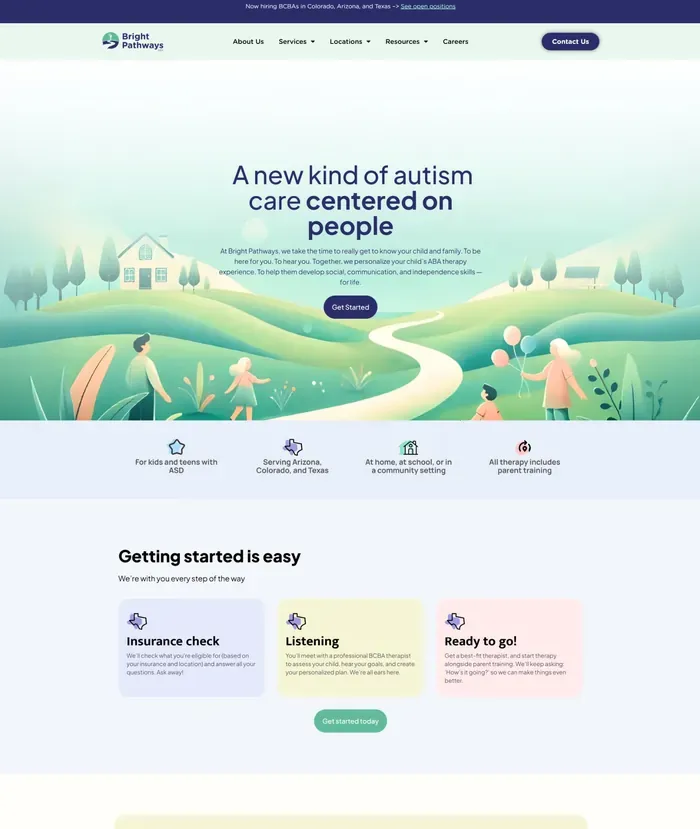
ABA therapy redesign with 3,000+ local pages across Arizona, Colorado, and Texas with Schema markup.
View live site: brightpathwaysaba.comHow we work
Every project follows the same four-phase process. You always know what week you're in, what's being delivered, and what we need from you. Fixed timeline, fixed price, in writing before we start.
DELIVERABLES
We audit your current site for technical SEO, Core Web Vitals, schema gaps, and booking friction. We map your target patient searches by specialty and city: Baltimore, Annapolis, Frederick, Bethesda. You receive a written strategy document covering keyword targets, GBP gaps, and the specific pages we'll build.
DELIVERABLES
We generate your homepage and key service pages using AI-assisted design, desktop and mobile, built around your practice's positioning and patient demographics. We draft all copy including physician bios, service descriptions, and FAQs. One consolidated feedback round keeps the project moving.
DELIVERABLES
Approved designs move into WordPress on our performance stack. Every physician bio, service page, and location page receives Physician and MedicalOrganization schema. Your booking platform is integrated and tested across mobile and desktop. You get a staging link to review weekly.
DELIVERABLES
We handle DNS cutover, 301 redirect mapping, and sitemap submission to Search Console. Your Google Business Profile and Healthgrades listing are audited and optimized in the same window. You receive a plain-English handoff video and a 30-day post-launch monitoring window.
Most practices are live within 10 weeks of their first call. No retainer required after launch.
Transparent pricing
Every tier is fixed price, fixed scope, fixed timeline, defined in a written statement of work before we invoice a dollar. No hourly billing. No surprise line items. You know exactly what you're buying and when it will be done.
All tiers available with a monthly care plan from $150/month, covering WordPress updates, weekly backups, uptime monitoring, and priority support within 4 business hours.
Complete guide
Everything Maryland medical practices, clinics, and healthcare providers need to know about building a website that attracts patients, ranks in local search, and handles sensitive health information responsibly.
A medical practice website isn't a business card online. It is a patient acquisition system, and the distinction matters from the first line of code to the last call-to-action button. Whether you need doctor website design for a solo practitioner or full healthcare website design for a multi-specialty group, the goal is the same: earn trust from someone who is anxious, in pain, or uncertain about their health, and convert that person into a booked appointment, frequently within a single session on a mobile phone.
The difference between a brochure site and a patient intake system shows up in measurable ways. A brochure site lists services, posts a phone number, and calls it done. A patient intake system has structured appointment request flows, insurance verification steps, new patient form downloads, and provider bios that answer the exact questions a first-time patient asks before deciding to call. Every page has a functional purpose in moving a visitor from awareness to appointment.
From a technical SEO standpoint, medical websites require provider schema markup, specifically the Physician and MedicalOrganization types defined in Schema.org's vocabulary. Generic LocalBusiness schema is insufficient for a specialty practice. Google uses structured data to understand who the providers are, what conditions they treat, and which hospital systems they're affiliated with. Without this markup, a practice competes blindly against hospitals and health systems that have entire SEO teams managing schema implementation.
Healthcare websites fall squarely into Google's YMYL category (Your Money or Your Life). Google's quality rater guidelines apply heightened scrutiny to any page where inaccurate information could harm a reader's health or safety. This means that thin, generic, or unattributed medical content actively suppresses rankings. Google expects medical content to demonstrate E-E-A-T: Experience, Expertise, Authoritativeness, and Trustworthiness. Experience means the content reflects real clinical knowledge. Expertise means it is produced or reviewed by a credentialed professional. Authoritativeness means the site is recognized within its medical domain. Trustworthiness means accurate citations, clear authorship, and transparent business information.
General web agencies fail healthcare clients not out of negligence but because their frameworks are built for e-commerce or service businesses, not healthcare web design. They use contact form plugins that collect health details without HIPAA consideration, choose shared hosting that can't provide Business Associate Agreements, and write service page copy that reads like marketing boilerplate rather than clinical content. They have no process for physician schema, no understanding of YMYL quality signals, and no workflow for getting content reviewed by a licensed provider before publication.
Online reputation shapes patient decisions before a website visit even begins. A 2024 survey by Software Advice found that 71% of patients use online reviews as their first step in finding a new doctor. Patients read Google reviews, Healthgrades ratings, and Vitals profiles before ever landing on a practice's own website. This means the website must reinforce what a patient has already seen on review platforms, not contradict it. Provider bios, patient testimonials where appropriate under Maryland law, and trust signals like board certifications and hospital affiliations must align with the external review record.
The page architecture of a medical practice website isn't arbitrary. Each page type serves a specific function in the patient acquisition funnel, and missing even one category creates a measurable drop in conversion and organic visibility. Maryland practices that built their sites five or more years ago have a homepage, a services list, and a contact page, and nothing else. That structure can't compete in 2025 search results.
The homepage is the trust and routing layer. It should establish the specialty and location within the first three seconds, present the primary conversion action (request an appointment), surface two to three trust signals (board certifications, years in practice, patient volume), and route visitors toward the specific content they need: provider bios, condition pages, or insurance information. A homepage that tries to explain every service in detail accomplishes none of these goals.
Individual provider bio pages are among the highest-value pages on a medical website. Patients choose doctors, not practices. A bio page that includes board certifications, fellowship training, hospital affiliations, conditions treated, and a genuine statement of clinical philosophy will outperform a bio that lists credentials in bullet points and nothing more. These pages also rank independently for physician-name searches, one of the most common healthcare query types.
Condition and service pages are where most practices leave the largest amount of organic traffic on the table. The principle is one page per condition. A cardiology practice that publishes a single "Heart Conditions" page can't rank for "atrial fibrillation treatment Maryland" or "heart failure specialist Annapolis" because those searches require dedicated pages with depth on each topic. Each condition page should define the condition, describe symptoms, explain diagnostic approaches, outline treatment options available at the practice, and provide clear next steps.
Additional pages that Maryland medical practices consistently underestimate include:
The SEO value of condition-specific pages compounds over time. A practice that publishes 20 well-structured condition pages, each with appropriate schema, internal links to related provider bios, and a clear conversion path, has 20 independent entry points into its website from organic search. A practice with one generic services page has one entry point. The arithmetic of patient acquisition favors depth.
Structured data markup is the layer of code that allows Google to understand the entities on a page: not just the words, but the meaning behind them. For medical practice websites, schema markup is particularly consequential because healthcare searches are entity-driven. When a patient searches "cardiologist near Annapolis MD," Google is looking for pages that explicitly declare a physician entity, a medical specialty, and a geographic location in their structured data. Pages without schema rely entirely on text signals; pages with accurate schema give Google a direct, unambiguous answer.
The Physician schema type (a subtype of Person) contains fields that map directly to patient decision factors. Key fields include name, medicalSpecialty, affiliation (the medical group or practice), hospitalAffiliation (specific hospital systems where the physician has privileges), description, image, telephone, and address. When these fields are populated accurately and completely, the physician's knowledge panel in Google Search becomes richer and the practice's local search visibility improves for specialty-plus-location queries.
MedicalOrganization schema applies to the practice itself and complements Physician schema on provider bio pages. It includes the organization's name, address, telephone, url, medicalSpecialty (which accepts an array of specialties for multi-specialty groups), and the priceRange field. For practices participating in specific hospital networks, the parentOrganization field creates a machine-readable relationship between the practice and its affiliated health system, a significant trust signal in Google's understanding of healthcare entities.
Condition pages benefit from MedicalCondition schema, which includes fields for the condition's name, associated anatomy, signs and symptoms, possible treatment (which can reference MedicalTherapy or MedicalProcedure entities), and the epidemiology field for prevalence data. MedicalProcedure schema is appropriate for procedure-specific pages such as a page on knee replacement, cardiac catheterization, or colonoscopy.
Common mistakes in medical schema implementation include:
To verify schema implementation, use Google's Rich Results Test and Schema.org's validator. Rich Results Test will identify whether a page is eligible for specific result types. The Schema.org validator will flag property errors and missing required fields. Both tools should be run after any website update that touches structured data. Schema markup also differs meaningfully by specialty. A psychiatry practice should not use the same schema template as an orthopedic surgery group, because the medicalSpecialty values, procedure types, and condition vocabularies are entirely different.
HIPAA (the Health Insurance Portability and Accountability Act) governs the handling of Protected Health Information (PHI). On a medical website, the HIPAA question is specific: does the website collect, transmit, or store information that could be classified as PHI? The answer depends on what the forms ask, how the data is processed, and where it is sent. Understanding the actual boundaries of HIPAA on websites prevents two equally harmful errors: reckless form design that creates compliance liability, and overcautious form restriction that prevents patients from booking.
HIPAA applies on a website when a contact form, chat widget, or appointment request form collects information that combines an identifiable individual with health data. Examples of PHI-creating form fields include asking for a diagnosis, describing symptoms, entering an insurance member ID, or specifying a medication. A form that asks for name, email, phone number, and preferred appointment time, without asking about health conditions, doesn't inherently create PHI. However, once that submission is connected to a patient record in the practice management system, the data may become part of the designated record set and fall under HIPAA requirements downstream.
Any vendor that handles PHI on behalf of a covered entity must sign a Business Associate Agreement (BAA). This applies to web hosting providers if they store form submissions that contain PHI, email service providers that transmit appointment request data, and chat platforms embedded on the site. Many popular web vendors (Google Analytics, standard Gravity Forms deployments, Intercom chat) do not offer BAAs in their standard plans. Some, like Kinsta and WP Engine, offer BAAs as part of enterprise or healthcare-specific service tiers.
SSL/TLS encryption (HTTPS) is a baseline technical safeguard required for any medical website. It is not sufficient on its own for HIPAA compliance, but its absence is a clear violation indicator. Every page of a medical website, including redirects, must be served over HTTPS with a valid certificate.
Implementing a compliant patient intake form requires more than adding an SSL certificate. A properly designed HIPAA-compliant appointment request form uses end-to-end encrypted form submission, stores data on servers covered by a BAA, sends notifications without transmitting the PHI payload in plaintext email, and provides an audit trail of data access. Gravity Forms with its Encrypted Fields add-on, combined with HIPAA-eligible hosting and a signed BAA, is one common WordPress implementation path.
A critical consumer warning: many web design agencies market themselves as "HIPAA web design" specialists without providing the technical infrastructure to support that claim. HIPAA compliance isn't a design aesthetic or a checkbox. It is a combination of administrative safeguards (written policies), physical safeguards (server security), and technical safeguards (encryption, access controls, audit logs). Practices should request a signed BAA from any vendor claiming HIPAA compliance and consult with their compliance officer or a healthcare attorney before deploying any form that collects patient health information online.
Patient search behavior follows predictable patterns, and physician website design Maryland practices that understand these patterns can structure their websites and online presence to capture demand at precisely the moment a patient is ready to book. The three primary query structures are condition plus location ("knee pain specialist Bethesda MD"), specialty plus city ("dermatologist Columbia Maryland"), and physician name ("Dr. [Name] Annapolis"). Each query type requires a different optimization strategy, and neglecting any one category leaves a portion of available patient volume on the table.
The Google Local Pack, the map-based results block that appears above organic listings for healthcare searches, is the most valuable piece of digital real estate for Maryland medical practices. Appearing in the local pack for specialty searches in the practice's service area can multiply website traffic and phone inquiries by two to five times compared to ranking only in organic results. Local pack inclusion depends primarily on proximity, relevance, and prominence: how close the practice is to the searcher, how clearly the Google Business Profile matches the search intent, and how strong the practice's overall web presence is.
Google Business Profile optimization for medical practices requires attention to several fields that general businesses ignore. The primary category must match the medical specialty (not the generic "Doctor" category). Secondary categories should reflect all specialties offered. The "Accepting new patients" attribute, when enabled, appears as a label in search results and directly influences click-through rates from patients who are actively seeking a new provider. Business hours must be accurate and updated for holidays. Services listed in the profile should mirror the condition and procedure pages on the website.
Citation consistency across medical directories is foundational to medical SEO and healthcare SEO more broadly. The major medical citation sources Maryland practices should maintain include:
NPI (National Provider Identifier) number consistency is a healthcare-specific citation factor that general SEO practitioners frequently overlook. For doctor SEO, this is one of the most commonly missed ranking signals. The practice name, address, and phone number associated with each provider's NPI record in the NPPES database should match exactly what appears on the website and all directory profiles. Mismatches between the NPI record and online citations create conflicting signals that reduce local search confidence.
Maryland's Medical Practice Act and Medical Board guidelines restrict how physicians may solicit reviews. Practices can't incentivize patients to leave positive reviews or selectively request reviews only from satisfied patients. A compliant review strategy involves reminding all patients of the option to share their experience online through post-visit communication, without directing them specifically to leave positive feedback. Even with these constraints, a consistent follow-up process produces measurably more reviews than passive waiting.
The conversion difference between a phone-only practice and one with online booking isn't marginal. It is structural. A significant portion of appointment searches happen outside of office hours, on mobile devices, by patients who won't leave a voicemail and will move to the next result if the first practice requires a phone call. Online booking removes that friction point. Practices that add online booking to an existing website consistently report appointment volume increases of 20 to 40 percent within the first six months, even without other changes to their marketing.
The major appointment booking platforms used by Maryland medical practices fall into two categories: standalone consumer-facing platforms and EHR-integrated patient portals. Consumer-facing platforms include Zocdoc, which aggregates patients actively searching for new providers and handles insurance verification before the appointment. EHR-integrated systems include Athena Health's patient portal, Epic MyChart (used extensively across Maryland's hospital systems), Kareo (now Tebra) for independent practices, and SimplePractice for behavioral health providers. Each platform has different integration options for practice websites.
WordPress integration with these platforms takes one of three forms: a direct link to the platform's patient-facing URL, an embedded iframe of the booking widget, or a custom booking facade that captures the patient's intent on the practice website before handing off to the platform. The direct link approach is the simplest and most performance-friendly but loses analytics visibility once the patient leaves the site. The embedded iframe approach is the most common and the most damaging to Core Web Vitals. A third-party booking iframe loading synchronously on a page can add two to four seconds to Largest Contentful Paint, pushing the practice out of Google's "good" performance threshold.
The booking facade approach, displaying a static representation of the booking interface that loads the actual widget only on user interaction, captures the performance benefits of a fast-loading page while preserving the on-site booking experience. This technique is similar to the YouTube facade pattern used for video embeds. When a patient clicks the "Request Appointment" element, the real booking widget initializes. Until that interaction, the page loads at full speed.
A well-designed booking flow collects the right information at the right stage. Before the appointment, the flow should capture insurance carrier and member ID for eligibility verification, the patient's reason for visit at a general level (new patient visit, follow-up, specific concern), and provider or location preference. Detailed symptom information, medication lists, and medical history are appropriate for secure new patient intake forms within the patient portal, not the public-facing booking widget. Collecting too much before confirmation increases form abandonment; collecting too little creates scheduling inefficiency.
Analytics tracking of the booking funnel requires event implementation in GA4. Each step of the booking process (page view, form initiation, insurance entry, confirmation) should fire a GA4 event so that practices can identify where patients abandon the flow. Practices that track this data discover that the majority of booking drop-off happens at the insurance verification step, which informs UX decisions about form layout and field sequencing.
Provider bio pages are the most read, most searched, and most conversion-influential pages on a medical practice website, and also the most frequently underinvested. A bio page is where a patient decides whether to trust a physician with their health. The quality of that page directly correlates with appointment bookings from patients who don't have a personal referral. In a market like Maryland, where patients have multiple qualified specialists within driving distance, the bio page is frequently the deciding factor.
Patients visiting a provider bio page are looking for specific information in a specific order. First, they verify the physician treats their condition or performs the procedure they need. Second, they check training credentials (medical school, residency, fellowship) and board certifications. Third, they look for hospital affiliations to understand where surgery or procedures would take place. Fourth, they read the physician's clinical philosophy and communication style to assess whether the provider's approach aligns with their own preferences. Fifth, they look for patient reviews or testimonials. A bio page that addresses all five in that sequence maximizes conversion.
From a technical SEO standpoint, bio pages should include complete Physician schema markup with every available field populated. The medicalSpecialty field should use Schema.org's accepted vocabulary. The hospitalAffiliation field should reference the hospital entity by its full legal name ("Johns Hopkins Hospital" not "Hopkins") to create a machine-readable relationship between the physician and the institution. The description field should be a concise, keyword-rich summary of the physician's specialty focus and patient population.
Photography direction for medical professionals differs from standard corporate headshots. Patients respond to images that convey approachability alongside competence. This means a semi-formal portrait in clinical attire, taken in a clinical environment or against a neutral background, with natural or studio lighting. Candid images showing the physician interacting with patients or colleagues are effective for building emotional connection on bio pages, provided patients in the images have signed appropriate consent forms. All images used on bio pages should be compressed to WebP format and served at appropriate dimensions. A 2MB JPEG headshot on a bio page is one of the most common performance killers on medical websites.
Bio copy should be written in first person or third person depending on the practice's brand voice, but it must never sound like a CV read aloud. Effective bio copy leads with the physician's area of clinical focus and the patient experience they specialize in, not with medical school graduation year. It uses plain language to explain complex training (a fellowship in interventional cardiology means the physician specializes in catheter-based heart procedures). It closes with a personal statement about the physician's philosophy or what drew them to their specialty.
Bio pages also function as independent SEO assets. A physician named Dr. Sarah Chen who practices rheumatology in Silver Spring will rank for "Dr. Sarah Chen rheumatologist" and "rheumatologist Silver Spring MD" on the strength of her bio page alone, provided it is properly structured with schema, internally linked from condition pages, and listed in major medical directories. Hospital directories link to practice websites from physician profiles, and these links carry domain authority from major health systems and meaningfully boost organic rankings for the linked bio pages.
Website performance isn't a technical nicety for medical practices. It is a patient acquisition variable. Research published by Google and validated by multiple independent studies establishes that a one-second delay in page load time reduces conversions by approximately seven percent. For a practice that books 200 appointments per month through its website, a two-second performance gap compared to a faster competitor could represent 28 fewer appointments monthly. Aggregated over a year, that is 336 lost patient acquisition opportunities attributable directly to load time.
Core Web Vitals are Google's three performance metrics used in its page experience ranking signal. Largest Contentful Paint (LCP) measures how quickly the largest visible element loads, with a target of under 2.5 seconds. Cumulative Layout Shift (CLS) measures visual stability: elements should not shift position as the page loads, which is disorienting on mobile and causes patients to accidentally tap the wrong element. Interaction to Next Paint (INP) measures responsiveness, specifically how quickly the page responds to user input like clicking a booking button.
Medical websites have a specific set of recurring performance problems. The most common include:
The recommended WordPress performance stack for Maryland medical websites includes WP Rocket for caching and file optimization (CSS/JS minification, lazy loading, and preloading), Cloudflare for CDN delivery and image optimization at the network edge, and server-side WebP conversion for all uploaded images. This combination, properly configured, improves LCP by 40 to 60 percent on an unoptimized medical website without requiring any changes to the site's content or design.
Patient portal links deserve special performance attention. Patients use the portal for prescription refill requests, lab result access, and billing, all high-urgency actions that happen on mobile devices during fragile moments of health anxiety. A patient portal link should never be buried in a navigation dropdown that requires JavaScript to open, and the page containing the portal link should be among the fastest on the site. If the portal itself is a third-party application, the practice website's role is to deliver the patient to the portal door as quickly as possible.
Mobile performance is especially consequential for practices serving older patient demographics. Patients over 60 are more likely to access medical websites on older mobile devices with slower processors and weaker connections. PageSpeed Insights scores the mobile experience separately from desktop and uses a simulated mid-range Android device for its mobile assessment. A medical website that scores 90+ on desktop but 40 on mobile has a performance problem that materially affects its largest patient segment.
E-E-A-T (Experience, Expertise, Authoritativeness, and Trustworthiness) is Google's framework for evaluating the quality of content on pages where the stakes of inaccuracy are high. For healthcare content, Google's quality rater guidelines describe medical pages as among the highest-consequence content on the web. A practice that understands E-E-A-T and builds its content strategy around it will consistently outperform practices that publish generic health articles copied from WebMD or populated by AI tools without physician review.
Experience in a medical content context means the content reflects genuine clinical knowledge from someone who has actually treated patients with the condition being described. This shows up in specific details: how a diagnosis is made in a clinical setting, what patients commonly misunderstand about a condition, what the recovery process actually looks like for a specific procedure. This specificity cannot be fabricated and is immediately recognizable to both patients and Google's quality raters.
Expertise requires that medical content be produced or reviewed by a credentialed professional. Every substantive health page on a practice website should carry a clear author attribution (the physician's name, credentials, and specialty) or a reviewed-by attribution if a content writer produced the first draft. Author schema should accompany the author byline to make the attribution machine-readable. A page with "Written by Dr. James Kim, MD, FACC, Interventional Cardiologist" and corresponding Physician schema is demonstrably more authoritative to Google than an unattributed "Heart Attack: What You Need to Know" article.
The structure of a condition page that maximizes both E-E-A-T signals and patient usefulness follows a predictable arc: definition of the condition in plain language, symptom description that matches how patients describe their experience, diagnostic process the patient can expect at the practice, treatment options available (distinguishing what the practice offers from what may require referral), and when to seek immediate care. This structure answers the questions patients actually have and does so in the sequence patients naturally ask them.
Linking to authoritative external sources such as NIH, CDC, Mayo Clinic, and PubMed signals to Google that the content is grounded in evidence-based medicine rather than marketing-driven claims. A condition page that cites a relevant PubMed study for a treatment efficacy claim is more authoritative than one that makes the same claim without citation. These outbound links don't "leak" SEO value in any meaningful way; they reinforce the page's trustworthiness signal.
A content calendar built around seasonal health concerns is one of the most effective organic traffic growth strategies for Maryland medical practices. Medical content marketing of this kind drives predictable results: allergy practices should publish content on tree pollen season in Maryland in late winter; orthopedic practices should publish content on sports injury prevention ahead of each sports season; cardiology practices should publish content around heart health awareness in February. These seasonal content windows generate predictable search volume spikes, and practices that have published relevant content before the season arrives capture that traffic consistently year after year.
Executed consistently, this approach to medical practice marketing and healthcare digital marketing compounds over time. Each published piece adds to the practice's topical authority and organic footprint, reducing reliance on paid advertising to reach new patients.
Technology decisions made at the beginning of a medical website project determine what the practice can and can't do for the next five to seven years. The wrong platform choice isn't merely inconvenient. It creates compounding constraints on schema implementation, form security, content structure, and SEO flexibility that no amount of optimization can fully overcome. Maryland practices evaluating their options need to understand the real trade-offs between platforms, not the marketing claims.
WordPress versus Squarespace or Wix is not a close comparison for medical practices. WordPress's open architecture allows complete control over structured data markup. Practices can implement Physician, MedicalOrganization, MedicalCondition, and MedicalProcedure schema with full field coverage, something neither Squarespace nor Wix supports adequately. WordPress allows practices to choose HIPAA-eligible hosting with a signed BAA. WordPress supports Gravity Forms with encrypted fields, the closest thing to a compliant patient inquiry form available in the WordPress ecosystem. Squarespace and Wix do not offer equivalent form security or schema control.
Within the WordPress ecosystem, the recommended stack for Maryland medical practices includes:
HIPAA-eligible hosting is a category that requires specific due diligence. Kinsta offers a signed BAA as part of its enterprise tier. WP Engine offers HIPAA-eligible hosting with a BAA through its dedicated healthcare solution. Both use infrastructure that meets the technical safeguard requirements for PHI storage. Standard shared hosting, regardless of the host's marketing language, does not constitute HIPAA-eligible infrastructure. Practices must request and retain a signed BAA before storing any PHI on the hosting environment.
SaaS medical website builders (platforms like Doctorlogic, PatientPop, and Perfect Patients) offer a tempting proposition: a ready-made healthcare website with built-in review management, online booking, and directory listings. The trade-off is significant for long-term patient acquisition. These platforms use shared URL structures, templated content that's difficult to differentiate from thousands of other practices on the same system, and proprietary hosting that can't be migrated without losing the SEO equity built under the platform's domain. When a practice leaves these platforms, they lose their rankings. A properly built WordPress website, by contrast, belongs entirely to the practice and accumulates SEO value that the practice owns permanently.
Multi-location medical practices face a website architecture decision that has significant long-term consequences for both local SEO and patient experience: should each office have its own website, a subdomain, or a dedicated page on a single unified domain? The answer, supported by both SEO evidence and patient behavior research, is consistently the same. A single domain with individual location pages is the optimal structure for the overwhelming majority of multi-location practices.
A unified domain concentrates all authority, backlinks, and content signals into one website. When a major Maryland health publication links to the practice's cardiology content, that authority applies to every page on the domain, including location pages for the Annapolis office, the Columbia office, and the Bethesda office simultaneously. Separate websites or subdomains split this authority. A practice with three separate websites has one-third the domain authority per site compared to what a unified domain would accumulate over the same period. The SEO math strongly favors consolidation.
Individual location pages must contain unique, substantive content to avoid the duplicate content penalty that destroys rankings for practices that simply clone a template page and change the city name. Unique content for a location page includes the specific physicians who practice at that location (linked to their bio pages), the services offered exclusively or primarily at that location, the specific address and parking information, the hours and contact number, any location-specific patient amenities, and a locally relevant introductory paragraph that addresses the community served by that office.
Each location page should carry its own MedicalOrganization schema block with the location-specific address, telephone, and geographic coordinates. The schema block for each location should also include openingHours in the correct schema format and the hasMap property linking to the Google Maps listing for that specific address. Don't use a single schema block for all locations. Google needs to associate each schema entity with a specific physical location for local search attribution.
Google Business Profile management for multiple locations requires a separate profile for each physical office. Each profile should be verified, claim the appropriate specialty category, and have its own review management strategy. The website URL listed in each location's GBP should link to the corresponding location page on the practice website, not the homepage. This creates a direct, machine-readable connection between the GBP entity and the website location page that strengthens local pack eligibility for that office's geographic area.
Internal linking strategy between location pages serves both SEO and patient experience goals. A patient landing on the Bethesda location page who discovers the specific specialist they need only practices at the Columbia location should be able to navigate there without leaving the site. A persistent location switcher in the header or a "Also serving" section at the bottom of each location page handles this navigation elegantly while creating internal link equity between all location pages.
Google Analytics 4 tracking for multi-location practices should include a custom dimension for location attribution. By tagging each location's appointment buttons and phone number click events with the location identifier, practices can generate reports showing which location drives the most online conversions and which location's pages underperform, actionable data for ongoing content and UX investment decisions.
Medical practice website costs in Maryland range from $1,500 for a basic 8-page site to $10,000 or more for a multi-provider, multi-location build with EHR integration, online booking, and custom patient portal design. Most single-specialty practices in Bethesda, Annapolis, or Baltimore fall in the $3,500 to $6,000 range for a full Growth-tier build.
Factors that increase cost: number of providers, number of locations, booking system integration (Zocdoc, NexHealth, Phreesia), HIPAA-compliance review, and the volume of service and procedure pages needed. A solo practitioner site costs meaningfully less than a group practice site with 8 physician bio pages and 20 service pages.
A medical practice website that can't be measured can't be improved. Yet the majority of Maryland medical practice websites operate without properly configured analytics, tracking page views and nothing else, or relying on default GA4 configurations that don't capture the specific events that map to actual patient acquisition. Setting up measurement correctly from the start transforms the website from a fixed cost into an accountable marketing asset with a demonstrable return.
Google Analytics 4 is the current standard for website analytics, having replaced Universal Analytics. For medical practice websites, the critical events to configure as conversions in GA4 include: appointment button clicks (any button that initiates or links to a booking flow), phone number clicks on mobile devices (one of the primary conversion actions for medical practices), contact and appointment request form submissions, direction request clicks from the location pages, and patient portal link clicks. Without these events configured as conversions, GA4 shows page views and sessions but nothing about the actions that translate to revenue.
Implementing these events in GA4 requires either Google Tag Manager configuration (preferred for flexibility and maintainability) or direct GA4 event code on the relevant page elements. Google Tag Manager allows non-developers to adjust event tracking without deploying code changes, which matters for practices that update their websites regularly through their WordPress admin panel.
Google Search Console provides the keyword data that GA4 does not. Search Console shows exactly which search queries drive impressions and clicks to each page, the average position for those queries, and click-through rate. For a Maryland medical practice, Search Console reveals a mix of branded queries (practice name, physician names), condition queries (symptoms and treatments relevant to the specialty), and local queries (specialty plus location). This data informs content decisions. Pages ranking on page two of results for high-volume condition queries are candidates for content improvement.
Call tracking is essential for practices that receive significant appointment volume by phone. Platforms like CallRail and CallTrackingMetrics insert dynamically swapped phone numbers on the website, with different numbers for different traffic sources, so that the practice can attribute phone calls to their origin (organic search, Google Ads, Google Business Profile, direct traffic). This closes the attribution gap that makes phone-heavy medical practices appear to have low website conversion rates when the actual conversion is happening by telephone.
Patient acquisition cost calculation for a website channel requires connecting website lead events to actual booked appointments. The formula is simple: total website and content investment in a given period divided by the number of new patients attributable to the website in that period equals cost per patient acquired through the website channel. Practices that implement this calculation consistently find that website-driven patient acquisition costs 60 to 80 percent less than paid advertising channels over a 12-month horizon, because organic traffic compounds without additional spend.
A monthly medical website performance report for a Maryland practice should include organic search traffic trend (sessions from Google), top-performing condition and service pages by traffic and conversion, keyword position changes for priority local queries, new referring domains earned in the period, Core Web Vitals status, appointment form submission volume, and phone click event volume. Realistic SEO timeline expectations should be set at the outset: a new practice website in a competitive Maryland market requires six to nine months of consistent content and technical investment before organic traffic becomes a primary patient acquisition channel. Established practices that are reconfiguring an existing domain may see results faster, within three to five months of structured optimization work.
How we compare
Maryland medical practices have four common website options. Schema depth, HIPAA-eligible hosting, and content ownership determine which builds long-term patient acquisition.
| Factor | Upcoming Brand (WordPress) | PatientPop / Perfect Patients | Wix / Squarespace | Generic local agency |
|---|---|---|---|---|
| Physician + Medical schema | Full JSON-LD: Physician, MedicalProcedure, MedicalOrganization | Platform-controlled | No custom schema | Generic LocalBusiness only |
| Booking integration | NexHealth, Zocdoc, Phreesia, Open Dental | Platform's own widget | Basic embed only | Varies |
| HIPAA-eligible hosting | Kinsta or WP Engine with signed BAA | Claimed; verify BAA separately | Not HIPAA-eligible | Varies |
| Monthly cost after launch | $150/month care plan | $400-$1,500/month locked | $23-$65/month platform | Retainer $200+ |
| Core Web Vitals | Guaranteed green on delivery | Substandard (platform bloat) | Acceptable | Depends on template |
| Condition and procedure pages | Individual page per condition + schema | Template pages, limited | No procedure-specific structure | Varies |
| Content ownership when you leave | 100% yours - domain and content | Rankings stay on PatientPop domain | You own domain, not code | Yours |
Every build includes
No add-on fees for the fundamentals. Every medical website design project ships with the complete stack at one fixed price.
Transparent pricing
A custom WordPress website for a Maryland medical practice costs between $1,500 and $10,000 depending on provider count and specialty complexity. Solo practitioner sites start at $1,500. Every quote is fixed-scope - one price, no hourly surprises.
Need to spread the cost? Use our payment plan calculator. Full pricing breakdown →
For local searches in smaller Maryland markets like Annapolis or Frederick, practices see meaningful ranking movement in 60–90 days. Competitive markets like Baltimore or Bethesda take 3–6 months for consistent first-page presence. GBP and Local Pack optimization produce the fastest early results, with improvement appearing within 30–45 days of launch.
The public-facing website integrates with your patient-facing booking tools (Zocdoc, NexHealth, Phreesia, or similar), not with your EHR directly. This keeps the public site outside your HIPAA compliance boundary. We do not connect websites to Epic, athenahealth, or eClinicalWorks directly. Appointment requests flow through the booking platform of your choice.
Yes, we write all copy as part of every project tier. You provide raw material via a structured questionnaire: physician credentials, medical school, residency, hospital affiliations, specialties, and any content focus areas. We draft copy that is factually accurate, credential-forward, and written for both patients and search engines. One review round included.
Not with proper migration planning. We map every existing URL to its new equivalent, implement 301 redirects before DNS cutover, and monitor crawl errors in the 30-day post-launch window. Clean migrations with full redirect maps recover quickly, within 4–6 weeks. We have never shipped a build without one.
Our WordPress care plan starts at $150/month and covers WordPress core and plugin updates, weekly backups, uptime monitoring, and priority support with a 4-business-hour response window. We also offer a content add-on for one new service page or location page per month, which builds your SEO footprint over time. Month-to-month with no annual contract.
Yes, this is exactly what the Growth and Custom tiers are built for. We create dedicated service pages for each specialty and location landing pages for each Maryland city you serve. Each page targets specific search queries like 'pediatrician Annapolis' or 'cardiologist Baltimore' with proper schema, copy, and internal linking to build topical authority across your full market area.
WordPress is the right platform for medical practices that want to rank in local search. Wix and Squarespace cannot fully implement Physician and MedicalOrganization schema - the structured data Google uses to surface practices in health searches and Knowledge Panels. A custom WordPress build ships with 90+ PageSpeed, passing Core Web Vitals, and the complete schema stack your competitors on generic platforms cannot match.
Medical websites · Maryland
★★★★★ 5.0 on Google · 99% Job Success on Upwork
30 minutes · We review your site, your market, and tell you exactly what we'd build and what it costs.